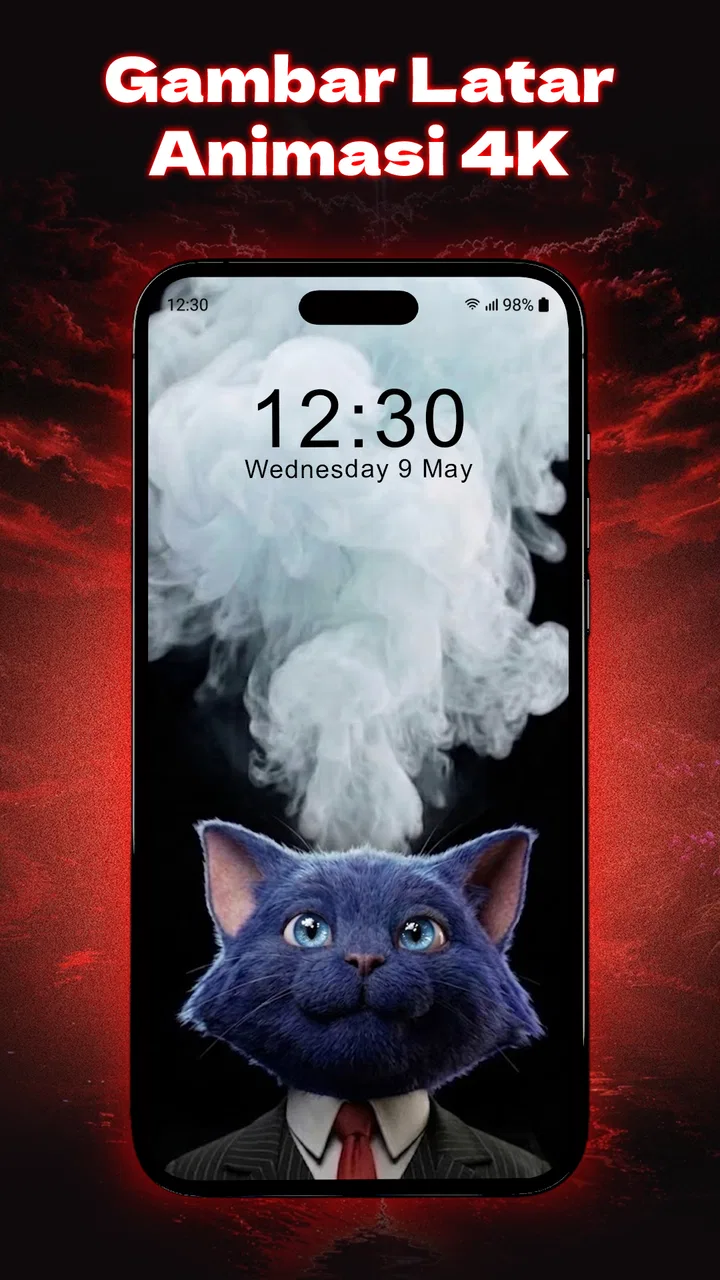
Fun Smile Silly Live Wallpaper
- 4.6
- Rating
- 5.00M
- Installs
- Free
- Price

 Analysis by App-foxy
Fun Smile Silly Live Wallpaper is the kind of personalization app I would install when my phone starts feeling too serious. Instead of settling for a static background, it puts a playful face-focused look on the screen and adds a charging animation to make a normally forgettable moment more noticeable. I found the idea simple, but that simplicity is also its appeal: there is no complicated productivity system to learn and no social feed demanding attention.
My overall impression is that this is best treated as a small mood-setting accessory for an Android phone. It will appeal to people who enjoy expressive wallpapers, funny faces, and a bit of movement whenever they check or charge their device. It is less convincing for anyone who wants a highly refined customization suite with deep control over every visual detail. The app is free to start, although optional purchases range from $3.99 to $14.99 per item, so the real value depends on how much variety and personalization you expect.
How the wallpaper feels during ordinary use
The first thing I noticed is that the concept works because it changes a familiar part of the phone without asking me to build a whole theme around it. A silly face on the background can make the lock screen feel more personal, while the charging animation gives the phone a little visual event when it is connected. That makes the app more distinctive than a regular wallpaper gallery, where the experience often ends after choosing an image.
You May Also Like

 Blood Strike: 2.5 Anniversary
Blood Strike’s Loadouts Turn Every Drop Into a Tactical Gamble
A close look at Blood Strike’s custom loadouts: how fast access to signature weapons reshapes its battle royale rhythm, rewards preparation, and narrows the gap between fights.

 Pandora - Music & Podcasts
Pandora’s Music Is Easy to Start, but Harder to Recover
Pandora’s strength is its low-effort path from a seed to a station. Its weak spot is how much confidence it asks you to place in connection, setup, and quiet recovery.

 8 Ball Pool
 Is Built on Rivalries, Rematches, and Routine
A close look at the rivalries, rematches, shared routines, and unanswered safety questions that turn a quick pool match into a persistent mobile community.

 Samsung Music
’s Quiet Strength Is Playing What You Already Own
Its reach comes less from spectacle than from dependable access to a personal library. That simplicity is both the app’s strongest retention engine and its ceiling.

 AccuWeather: Weather Radar
AccuWeather Review: A Quick, Clear Forecast for Everyday Decisions
For everyday plans, the best forecast is the one you can understand quickly. AccuWeather makes rain timing, radar, and local conditions easy to act on, with a few trade-offs.

 Hill Climb Racing
Why Hill Climb Racing Still Turns Crashes Into One More Run
A tiny car, a bumpy hill and one more upgrade: Hill Climb Racing keeps resurfacing because its simple chaos makes every near-miss feel personal.
More From Our News Desk



In everyday use, I would keep this type of wallpaper on a secondary phone, a family device, or my main phone during a relaxed period rather than during a formal work week. It suits someone who wants a visible joke or cheerful expression every time the display wakes. A teenager might enjoy the playful presentation, and an adult could use it simply to make a familiar device feel less bland. The Everyone age rating also makes the tone broadly approachable rather than aimed at a narrow audience.
The app comes from Anderson Tony and sits in the personalization category. That matters because its purpose is not to replace the phone’s launcher, messaging tools, or charging controls. I see it as a focused visual layer. If you already enjoy changing backgrounds with the seasons or matching your phone to your mood, this is more memorable than another collection of landscapes. If you rarely look at your lock screen, however, the novelty may pass quickly.
One useful way to judge it is to ask how often you actually connect your phone to power. The charging animation is most relevant at that point, so a person who charges overnight and never watches the screen may get less from it than someone who plugs in at a desk, in a car, or beside a sofa. In my view, the app’s strongest use case is a phone that is visible during charging, where the animation can become a small conversation starter or a cheerful visual cue.
What to expect from speed and responsiveness
I would not install a live wallpaper expecting it to behave exactly like a still image. Any moving background has more visual activity than a fixed photo, and this app adds another animated moment around charging. The sensible expectation is that the phone should remain usable while the wallpaper adds atmosphere in the background, not that it should become a performance feature.
On a reasonably modern device, the experience should be judged by how quickly the wallpaper appears after unlocking, whether the animation feels smooth enough to be pleasant, and whether the phone returns to its normal appearance after charging ends. Those are more useful questions than simply asking whether the app looks lively. A wallpaper that is visually amusing but interrupts the first second of every unlock would quickly become irritating.
I also recommend giving the app a short trial during the parts of the day when you use the phone most. Check it after several unlocks, when switching between apps, and when connecting a charger. That workflow reveals more than a quick installation because live visuals can feel fine in a brief test but become distracting when repeated dozens of times. For me, the right balance is animation that I notice occasionally, not movement that competes with icons and notifications.
A practical tip is to keep the home screen layout relatively clean while using a face-based wallpaper. Too many widgets, bright icons, and a busy animated background can make the display feel crowded. The app’s playful look works better when the surrounding interface gives it room. This is not a hidden setting; it is a simple design trade-off that makes the result look more intentional.
Busy moments, charging, and resource expectations
The most demanding moments are likely to be the ones in which the phone has to display movement while I am also doing something else, such as unlocking, opening an app, or connecting power. I would pay particular attention to those transitions. A wallpaper can be perfectly acceptable while the phone is idle but feel less comfortable if the animation remains visually aggressive during a quick task.
Charging is an especially interesting case because it is both the app’s most distinctive moment and a time when people often leave the phone unattended. If I place the device on a desk while working, the charging animation can add personality without affecting my main activity. If the phone is beside my bed, though, repeated brightness or movement could be unwelcome. In that situation I would either use a calmer wallpaper or remove the app before bedtime.
I would also avoid treating a live wallpaper as harmless simply because it is decorative. Moving visuals can have a different effect from a still background, and the impact may vary between phones. If the device already feels warm, is running many apps, or has an older battery, I would test this app cautiously rather than assuming it will be invisible to the system. The app is compatible with Android 7.0 and later, but compatibility does not mean every device will present animation in exactly the same way.
There is a useful distinction between occasional visual activity and constant attention. I would be comfortable trying the app on a phone that spends much of the day idle, but I would be more selective on a device used for navigation, gaming, video calls, and long work sessions. In those cases, a static wallpaper is usually the safer choice because it removes one more moving element from an already busy environment.
Another realistic scenario is a shared household phone. A funny face can make the device easier to recognize and more inviting for children or guests, while the Everyone rating keeps the presentation broadly suitable. The trade-off is that a strong visual style may not suit every person who uses the phone. If several people depend on the same device, a neutral image may be more practical than a deliberately silly one.
Stability, recovery, and what I would watch for
For me, reliability in a wallpaper app is not only about whether it opens. It is about whether the chosen visual remains available after restarting the phone, whether the charging animation appears when expected, and whether the normal home screen remains usable if the animated layer stops. These are the moments that determine whether personalization feels helpful or becomes maintenance.
I would test the app across a few ordinary recovery situations: lock and unlock the device, connect and disconnect the charger, restart the phone, and switch briefly to another wallpaper before returning. That sequence is useful because it checks whether the app behaves like a background component rather than a one-time preview. If something looks wrong, reapplying the wallpaper or restarting the phone would be my first simple troubleshooting steps.
The good news is that a wallpaper problem is usually easier to isolate than a problem inside a messaging or banking app. If the animation does not appear, the phone itself should still remain usable, and I can fall back to a static background. That makes experimentation relatively low-risk. I would still remove it if the device repeatedly forgets the selection, shows unwanted visual interruptions, or feels less responsive after installation.
Because the app has a current version of 11.0, I would expect users to approach it as an actively presented product rather than an abandoned experiment. I would not turn that into a promise that every phone will behave identically, but it is a useful point when deciding whether to try it. The app has also reached over a million installs and carries a 4.5 average from around 9.4 thousand ratings, which suggests that the basic concept has found a substantial audience. Those figures do not replace personal testing, especially with a visual app whose appeal is subjective.
One limitation I would keep in mind is that live wallpaper behavior can depend on the phone’s own software. Battery-saving modes, manufacturer-specific background rules, and launcher behavior may influence how consistently animation is shown. I would not blame the app immediately if a charging effect looks different after a system update. First I would check whether the phone has changed its battery or display settings, then decide whether the result is still worth keeping.
Device fit, storage choices, and purchase expectations
The minimum operating system is Android 7.0, so the app is available to a wide range of Android phones. That broad support is convenient, but older hardware deserves a more careful trial. A phone that already struggles with transitions or has limited battery endurance may benefit more from a static image. Newer hardware is the more comfortable match if you want the animated presentation to feel like decoration rather than another task competing for attention.
Screen size also affects the experience. On a compact display, a funny face may remain clear and recognizable without overwhelming the interface. On a large screen, the same design can become a much stronger visual statement, especially when icons sit over it. I would spend a few minutes checking whether text and app icons remain easy to read before deciding that the wallpaper is a keeper.
The free entry point makes trying it straightforward, but the in-app purchase range means I would not assume every available option is included. My advice is to use the free experience long enough to decide whether the style itself fits your routine. If you only want a lighthearted background and occasional charging animation, paying for extra items may not be necessary. If you enjoy rotating several looks, then the optional purchases may make more sense, provided the added variety feels meaningful to you.
This is also where the app differs from the usual alternatives. A standard static wallpaper app generally offers more neutral flexibility: photographs, gradients, abstract art, or personal images can suit work, travel, and shared devices. A launcher theme can go further by changing icons and interface colors. Fun Smile Silly Live Wallpaper is narrower but more characterful. It does one playful job instead of trying to redesign the entire phone.
I would skip it if your priority is maximum battery conservation, a professional appearance, or precise control over every element on the screen. I would also skip it if animated faces are likely to distract you while reading notifications. On the other hand, I would recommend trying it if you want a quick visual refresh, enjoy humorous customization, and like the idea of the phone doing something noticeable when it starts charging.
Who will get the most from this app?
The best match is someone who sees personalization as a form of self-expression rather than a technical project. You do not need to create a complete theme or spend time editing images. The app’s appeal is immediate: choose a playful direction, let the phone carry that mood, and decide whether the charging animation adds enough charm to justify keeping it.
It can also work well for a temporary change. I might use it during a holiday, while setting up a child’s device, or when giving an old phone a more cheerful identity. That temporary mindset is helpful because it keeps expectations realistic. Not every wallpaper needs to become a permanent part of the phone; sometimes a small visual change is valuable precisely because it breaks routine for a while.
For a work phone, my recommendation is more cautious. The look may be perfectly harmless, but a silly face can clash with a formal environment or make the lock screen harder to read if the design is visually strong. I would test it on a personal device first and compare it with a quiet static background. If the animated option makes me pause before reading a notification, it is not the right choice for that particular phone.
Privacy-conscious users may also prefer to keep their expectations modest and review the app’s Android access prompts during installation. A wallpaper tool should feel lightweight and focused, so I would be uncomfortable granting access that seems unrelated to displaying the background or animation. This is good practice for any personalization app, and it helps keep the experience aligned with what I actually want from it.
My performance verdict after living with the idea
Fun Smile Silly Live Wallpaper succeeds when I treat it as a playful visual accent, not as a complete customization platform. Its funny-face presentation and charging animation give it a clearer identity than a basic wallpaper picker, and the free starting point makes experimentation easy. The developer is Anderson Tony, the app is rated for Everyone, and its broad Android support makes it accessible to many users.
My main reservation is the normal one for moving personalization: the more activity a wallpaper adds, the more carefully I need to judge distraction, battery behavior, and device responsiveness. I would test it during real charging and repeated unlocks rather than deciding from a single preview. On older or already busy phones, a static alternative may be the smarter choice even if this app looks more entertaining.
For the right person, though, that trade-off is worthwhile. If you want your phone to feel cheerful, enjoy expressive faces, and like a small animation when the charger is connected, this app offers a focused way to get there without rebuilding the whole interface. I would recommend trying the free version first, keeping the home screen uncluttered, and watching how the device behaves over a normal day. If the animation remains pleasant rather than intrusive, it is an easy little upgrade for a phone that could use more personality.
FAQs for Fun Smile Silly Live Wallpaper
01What is Fun Smile Silly Live Wallpaper?
Fun Smile Silly Live Wallpaper is a vibrant and interactive wallpaper app designed to bring joy and amusement to your device's home screen. It features a variety of animated smiley faces and silly graphics that react to your touch, creating a fun and lively experience every time you use your phone.
02Is Fun Smile Silly Live Wallpaper compatible with my device?
Fun Smile Silly Live Wallpaper is compatible with most Android and iOS devices. However, to ensure optimal performance, your device should be running on the latest operating system version. Check the app requirements in the Google Play Store or Apple App Store to verify compatibility with your specific device model.
03Does Fun Smile Silly Live Wallpaper consume a lot of battery?
Live wallpapers can be more demanding on battery life than static ones. However, Fun Smile Silly Live Wallpaper is optimized for efficiency, minimizing battery drain by pausing animations when the device is not in use. Users can also adjust settings to further reduce battery consumption.
04Can I customize the animations in Fun Smile Silly Live Wallpaper?
Yes, Fun Smile Silly Live Wallpaper offers various customization options. Users can choose from different smiley designs, adjust animation speed, and select colors to personalize their experience. These features allow you to tailor the wallpaper to your preferences, making your device uniquely yours.
05Is there a cost to download Fun Smile Silly Live Wallpaper?
Fun Smile Silly Live Wallpaper is available as a free download with optional in-app purchases. The free version includes basic features, while additional designs and customization options can be unlocked through purchases. This model allows users to enjoy the app with no initial cost while offering premium enhancements.
Pros
- Highly customizable with vibrant themes.
- Consumes minimal battery life.
- User-friendly interface for easy setup.
- Supports both landscape and portrait modes.
- Frequent updates with new designs.
Cons
- Limited free features without upgrade.
- Occasional ads in the free version.
- Not compatible with older devices.
- May slow down low-end phones.
- No offline mode for theme downloads.

Fun Smile Silly Live Wallpaper
Gallery